


AppBlock - Block Apps & Sites
4.74.42K Reviews
App Specs
- Version
- 7.19.3
- Updated On
- License
- Free
- Downloads
- 10,000,000+
- Developer
- MobileSoft s.r.o.
- Categories
- Productivity
- Platform
- Android, iOS
Screenshots
 Analysis by AppCompare
I first noticed AppBlock’s value when I stopped expecting myself to resist every distraction through willpower alone. Its central idea is practical: choose the apps and websites that pull you away, then arrange blocks around the times you want to focus. That turns a vague intention to spend less time scrolling into a boundary I can plan for. The app is free to install, and MobileSoft s.r.o. has built it for everyday productivity rather than for people who want a complicated system to manage.
Why blocking can change a workday
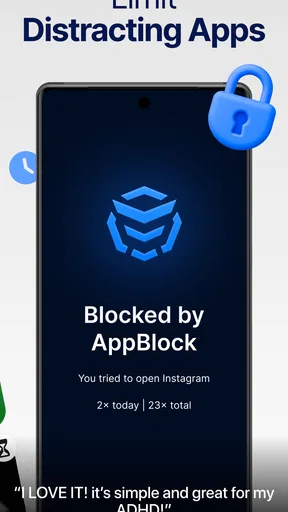
A reminder to focus is easy to ignore; a block is harder to brush aside in the moment. That distinction is what makes this approach useful for people whose attention is repeatedly drawn to the same few apps. Instead of deciding every time whether to open a social feed, I can make that choice in advance and let a profile handle the boundary during a work or study period.
That doesn’t make the app a cure for procrastination. It deals with specific digital temptations, not with a difficult task, low energy, or a noisy environment. I think of it as one useful piece of a focus routine: it can remove an easy escape route, while the user still has to decide what to work on and how to structure the rest of the day.
Setting up a block that does not get in your way
When you create a profile, start with the apps and sites that genuinely interrupt you rather than blocking everything out of caution. For example, someone writing a report may want to restrict social apps while leaving a browser available for research. Blocking the entire browser can stop casual browsing, but it can also shut off searches and work tools you need. I learned that the useful boundary is usually selective, not maximal.
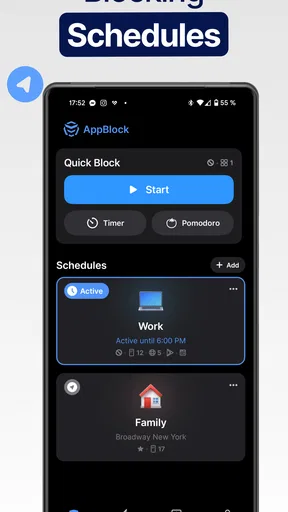
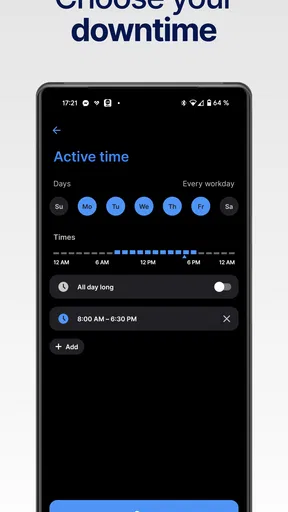
Schedules make those boundaries easier to follow consistently. You can choose particular days as well as times, which helps separate a weekday routine from a more relaxed weekend. Before relying on a schedule, think through the exceptions: a late meeting, a class that moves, or a task that needs a site you normally avoid. A quick review of the profile before the day begins can prevent a well-meant block from interrupting legitimate work.
Profiles are also helpful when your needs change over the day. A study session might call for blocking social apps, while family time could call for a different set of limits. I’d keep each profile focused on one situation and give it a clear purpose. If a profile tries to cover every possible distraction and every exception, it becomes harder to understand and maintain.
What the tools are useful for
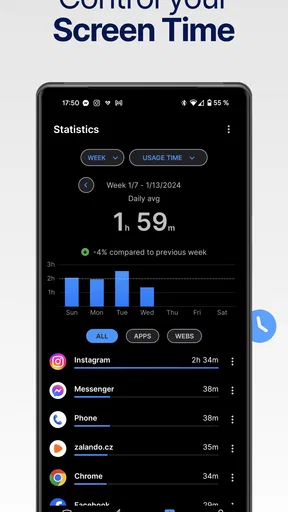
The app combines scheduled blocking with an app usage tracker, so you can compare what you meant to do with where your time actually went. I find that pairing more useful than treating usage information as a score. If one app keeps taking attention despite a reasonable schedule, that is a clue to adjust the profile or reconsider when you use it—not a reason to feel guilty about a number.
Worth Reading Before You Choose

EA SPORTS FC Mobile 26 Is a Bigger Football Game, but It Takes Time

Flipboard Shows What News Apps Must Do Beyond the Feed

Switching to Android Auto Means Rethinking Your Driving Routine

Google Calendar Makes a Crowded Week Easier to Manage

Ludo King Makes the Most of the Minutes Between Plans

Baby Panda World Brings Quick Play to Modern Phones, but Its Game Library Feels Busy
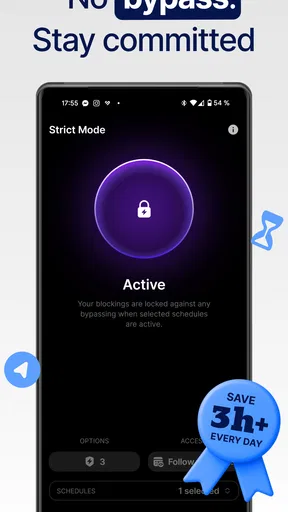
Strict Mode is aimed at moments when a normal plan feels too easy to undo. Making a block harder to disable can help if you tend to cancel limits as soon as an urge appears. It is also a feature to approach carefully: if you depend on an app for an unexpected work message or another important task, a restrictive setup may create needless friction. I would test a profile with ordinary blocks first and reserve a stricter approach for a routine I already understand.
The best first experiment is small. Choose one predictable period, block only the main distraction, and see whether the interruption pattern improves. If you find yourself needing the blocked app for a genuine reason, note when and why before changing the schedule. That gives you a more useful adjustment than abandoning the profile after one inconvenient moment.
A realistic day with AppBlock
Imagine setting aside the first part of a weekday morning for a report. A work profile can restrict the social apps you tend to check, while leaving the browser accessible for reference material. When the scheduled period ends, the restrictions can fit the transition to the rest of your day rather than requiring you to remember to turn them off manually. The point is not to make every hour strict; it is to protect a specific block of time that tends to disappear into phone checks.
For a student, the same idea can be applied to a planned study session, with a separate profile for a different subject or routine if the distractions change. For someone trying to be more present at home, a profile can focus on the apps that invite habitual checking. In both cases, it helps to start with a realistic limit. If you block useful communication along with entertainment, the setup may feel like a punishment and be abandoned before it becomes a habit.
Where it differs from simpler options
Phone-level screen-time controls are often enough for someone who only wants a basic limit or a broad reminder. AppBlock is a better fit when you want to organize restrictions into profiles and attach them to particular days and times. On the other hand, if you only need a single occasional pause, setting up a dedicated blocker may feel like more management than the problem deserves.
Compared with relying on focus timers or self-imposed rules, AppBlock’s main advantage is that it targets chosen apps and websites rather than simply asking you to stay on task. A timer can help divide work into sessions, but it does not by itself remove the tempting destination. A blocker can help with that part, though it cannot decide which task matters or replace a timer, calendar, or task list if those are what your routine lacks.
There is a trade-off between a strong boundary and flexibility. A broad block can reduce temptation, but it can also catch a tool you need unexpectedly; a narrow block is less disruptive but leaves more openings. I’d adjust one item at a time so you can tell whether a change actually helps. This is especially important if your work depends on a browser, messaging, or other apps that serve both useful and distracting purposes.
Who gets the most from it—and who may not
I’d recommend trying it if you repeatedly open the same social or entertainment apps during work, study, or another activity that needs concentration. It is also a reasonable option for anyone who wants a visible routine around phone use, rather than relying on a fresh decision every time a notification or habit prompts them to check. AppBlock is rated for Everyone, and its productivity focus makes sense for adults as well as younger users working on more deliberate screen habits.
Parents who want to guide a child’s device habits may find the idea of scheduled limits appealing, but I would treat blocking as part of a conversation rather than a substitute for one. A child may need different access for homework, family communication, and leisure. The profile should reflect those practical differences, and any restrictive setting should be chosen with care so useful access is not blocked along with distractions.
It may not suit people who need uninterrupted access to every app throughout the day, or those whose schedules change too often for fixed time blocks to be helpful. It is also not the right solution if the main problem is an overloaded workload or difficulty deciding what to do next. In those cases, a task planner, calendar, or simple phone setting may be a better first step, with blocking added only if a recurring app habit is still getting in the way.
Worth trying, with a little planning
AppBlock has a 4.7 average from around 210,000 ratings, and it has been installed over 5 million times. It is free to use, with in-app purchases ranging from $0.99 to $119.99 per item. The current version is 7.15.2, and it requires Android 9 or later. Those details make it easy to see that it is an established option, but whether it fits you comes down to how much control you want over specific distractions and schedules.
My practical recommendation is to begin with one profile for one recurring situation, then keep the first schedule modest. Check whether the apps you blocked were genuinely the problem and whether anything important was caught in the process. If the boundary helps, refine it gradually; if it creates more interruptions than it prevents, loosen it or use a simpler control. That careful setup is more likely to make the app useful than trying to lock down your whole phone at once.
Ever found yourself lost in the endless scroll of social media or playing games when you should be working? Yeah, me too. That's where AppBlock - Block Apps & Sites comes in. This nifty app is your personal productivity ninja, slicing through distractions like a pro. Let me walk you through my experience with it.
Getting Started with AppBlock
First things first, downloading AppBlock is a breeze. Available on both Android and iOS, it installs quickly and has a super intuitive interface. The moment you open the app, it hits you with a simple, no-nonsense layout. No clutter, no fuss, just straight to business.
The setup is also straightforward. You create a profile, which essentially outlines what you want to block and when. For instance, if you’re someone who gets easily distracted by Instagram during work hours, you can set AppBlock to block it from 9 to 5. You can even choose specific days, so your weekends stay Instagram-friendly.
Features That Make a Difference
Now, let’s dive into the features that make AppBlock stand out. It’s not just about blocking apps; it’s about giving you control over your time. Here’s what caught my eye:
- Custom Profiles: Create different profiles for different needs. Whether it's work mode, family time, or study sessions, you decide what stays and what goes.
- Scheduler: This is a game-changer. Set specific times and days for blocking apps and websites. It’s like having your own digital doorman.
- App Usage Tracker: Want to know where your time goes? This feature gives you insight into your app usage habits, helping you make smarter choices.
- Strict Mode: Feeling tempted? Activate this mode and make it extra hard to disable the blocks. No more sneaky peeks!
Smooth Sailing or Bumpy Ride?
Using AppBlock has mostly been smooth sailing. It does exactly what it promises without any hiccups. The app runs quietly in the background, so you barely notice it until it blocks you. That’s when you remember why you downloaded it in the first place.
However, there were a couple of times when I found it a bit too effective. I had blocked my entire web browser for a work profile, and let’s just say, Google searches are not optional when you’re trying to complete reports. So, a little advice from me to you: plan your profiles wisely!
Why You Should Consider AppBlock
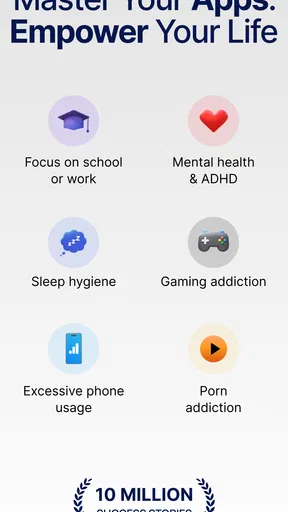
So, who is AppBlock for? Honestly, anyone who feels like they need a digital detox or just wants to be more productive. Whether you’re a student trying to focus on studies, a professional avoiding distractions, or a parent wanting to limit your kids' screen time, this app is a solid choice.
Also, if you’re someone who loves tracking your habits, the usage tracker is a fantastic tool. It’s like having a personal coach that helps you stick to your goals by showing you the cold, hard truth about your digital habits.
Final Thoughts
In a world where distractions are just a tap away, AppBlock - Block Apps & Sites is like a breath of fresh air. It’s not about making your phone less fun; it’s about making your time more valuable. If you’re ready to take control of your screen time, this app is definitely worth a shot. It’s easy to use, highly effective, and genuinely helps in boosting productivity. Give it a try, and see how it transforms your daily routine!
Pros
- Easy to use interface for quick setup.
- Customizable blocking schedules.
- Helps improve productivity efficiently.
- Supports both apps and websites.
- Battery-friendly operation mode.
Cons
- Limited features in free version.
- Some apps bypass blocking occasionally.
- No support for multiple devices sync.
- May require manual updates.
- Ads in free version can be intrusive.
FAQs for AppBlock - Block Apps & Sites
What is AppBlock and how does it work?
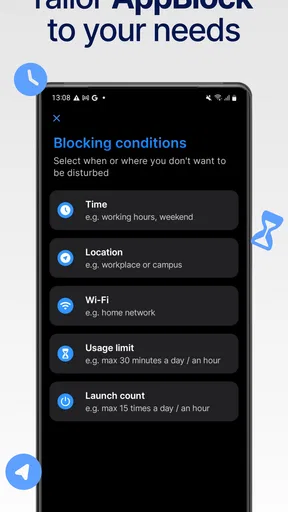
AppBlock is a productivity app designed to help users manage their time by blocking distracting apps and websites. It allows you to create profiles with specific blocks based on time, location, or Wi-Fi connection. Once set, it restricts access according to your preferences, helping you stay focused on important tasks.
Can I customize the blocking schedules in AppBlock?
Yes, AppBlock offers extensive customization options for blocking schedules. You can set specific days and times for each profile, allowing you to tailor blocks around your work or personal schedule. This flexibility ensures that you can maximize productivity without unnecessary interruptions.
Does AppBlock allow for temporary bypassing of blocks?
AppBlock provides a feature that lets you temporarily bypass blocks if necessary. However, this is controlled to prevent misuse. You might need to enter a specific code or wait a certain period to access blocked content, ensuring that the app remains effective in enhancing productivity.
Is AppBlock safe to use on my device?
Yes, AppBlock is safe to use and respects your privacy. It does not collect personal data or track usage beyond what’s necessary for its functionality. The app is designed to improve your productivity without compromising your privacy or device security.
Does AppBlock require a subscription for full features?
AppBlock offers both a free version and a premium subscription. The free version includes basic blocking features, while the premium version provides advanced options such as unlimited profiles, time limits, and more detailed customization. Subscribing unlocks the full potential of the app.


